What is region lock, and how do I avoid buying the wrong key?
Region lock means a key activates only on an account in the region it was sold for. A Global key works on any account, while a Europe key needs an account in Europe. Every Andalu product page names the key's platform and region before you buy, so compare them with your account first.
Before you start
Know which platform you'll play on, and which account. The region that counts is that account's.
Not sure where your account is set? Follow Check your account's region below first.
Check the key's region before you buy
- 1
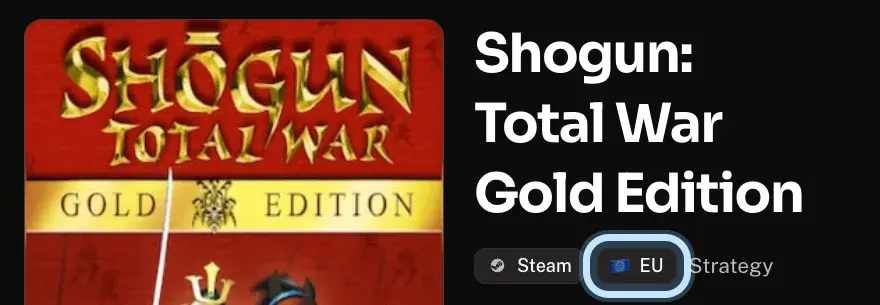
Open the game's page on Andalu. The tags under its name show the platform and the region: Steam and EU (Europe) in this example.
Global means the key works in any region.
Other means a region we don't list by name. Ask us which countries it covers before you buy.
- 2
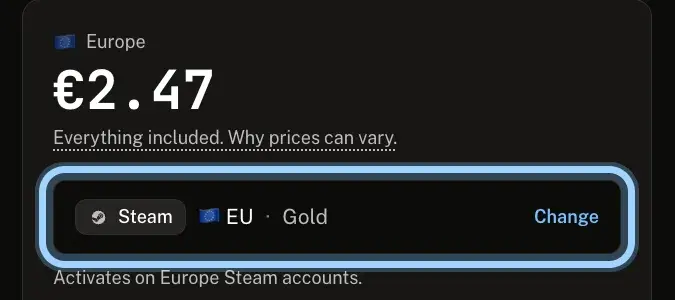
In the buy box, check the line next to Change. It shows the platform, region and edition you're buying, and the line under it says which accounts the key activates on.
Want another version? Select Change to see every platform and region we have for the game.
- 3
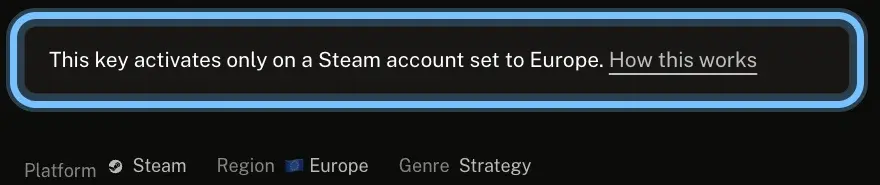
Scroll to How activation works. A key for one region says so there: "This key activates only on a Steam account set to Europe."
- 4
Let Andalu check it for you. Tell us your platform and region once, and every buy box then says whether the key works on your account: see Can I check a key will work before I buy it?
Check your account's region
Each platform keeps the region on your account. Here's where to see it, from each platform's own guide.
- 1
Find your platform in the list below, and look up the country or region it names.
Steam: your store country follows the country you live and pay in, and a key can't change it. Steam's region rules
PlayStation: on the PlayStation Store website, select your profile picture, then Storefront Country. PlayStation's region rules
Xbox: sign in at account.microsoft.com and select Your info. Xbox's region rules
Nintendo: sign in on the Nintendo Account website, select User Information and look under Country/region of residence. Nintendo's region rules
Epic Games: open your Epic Games account and look at Country/Region under Personal details. Epic Games' region rules
EA app: sign in to your EA Account, open Account information and look under Regional settings. EA's region rules
Battle.net: your region comes from the country of residence in your Battle.net account settings. Battle.net's region rules
Ubisoft Connect: your account's country must match where you live. Ubisoft's region rules
GOG and Rockstar Games: a key for one region is checked against the country you redeem it from. GOG's region rules · Rockstar's region rules
- 2
Compare it with the key's region. A Europe key needs a European country, for example.
Not sure your country is inside the key's region? The publisher decides exactly which countries a region covers, so ask us before you buy.
Troubleshooting
| What you see | What it means | What to do |
|---|---|---|
The buy box says Set your region to check this key works for you | You haven't told Andalu your region | Select Set region at the top of the page and choose your platform and region. How |
The buy box says Won't activate on your account: this key is Europe only (or another region) | The key's region isn't the region you set | Select Change in the buy box and pick a version for your region. Only buy it if it's for someone whose account is in that region |
The region tag says Other | A region we don't list by name | Ask us which countries it covers before you buy |
You're not sure your country is inside the key's region | The publisher decides which countries a region covers | Ask us before you buy |
You can't find your account's region | Each platform keeps it in a different place | Step 1 of Check your account's region above names the page for each platform |
The platform refused your key with a region message | The key is for another region than your account | Don't retry. See wrong platform or region |
You already bought a key for another region | It won't activate on your account, and retrying won't change that | Don't redeem it or keep trying. See wrong platform or region |
Frequently asked questions
Related articles
Still stuck?
Contact us with your order number and the exact message you see, word for word, including any error code. We reply by email, usually within a day.