How does Andalu protect me if something goes wrong?
Andalu checks every order, covers it with buyer protection, and replaces or refunds a key that doesn't work, with no claim fee. It protects you at three points. Before you buy, each game's page tells you whether its key activates on your account. When you pay, the price can't go up and your card details stay with Stripe. After you buy, if a key doesn't work, we replace it or refund you, with no claim fee.
Buyer protection covers you for 24 hours after delivery. A key that doesn't arrive, doesn't work, or doesn't match its listing is covered. A key that matches its listing but not your account's region is reviewed, never promised, and a change of mind about a key that works isn't covered. Checkout guards against fraud too: every buyer confirms their mobile number with a text code before paying, your bank may ask you to confirm the payment, and some orders are checked before we deliver them.
Before you buy
- 1
Set your region at the top of the page. See how to set your region.
- 2
On the game's page, check that the line under the version says Activates on your account.
- 3
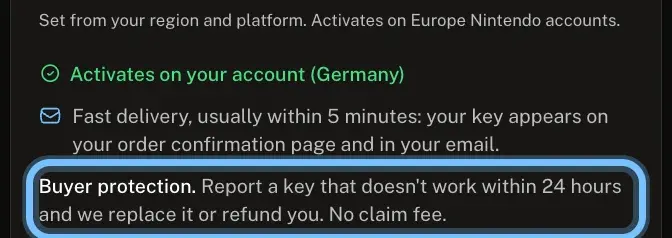
Read the Buyer protection line, just above Sold and delivered by Andalu. It's the promise that covers this key.
Buying a key that doesn't match your region? Andalu asks you to confirm first, in a box titled "This key won't activate on your account". Buy it anyway and buyer protection can't make it work on your account: that case is reviewed, never promised.
If a key doesn't work
- 1
Stop trying the key. Many platforms block redeeming for a while after several failed tries.
- 2
Take a screenshot of the message, including any error code.
- 3
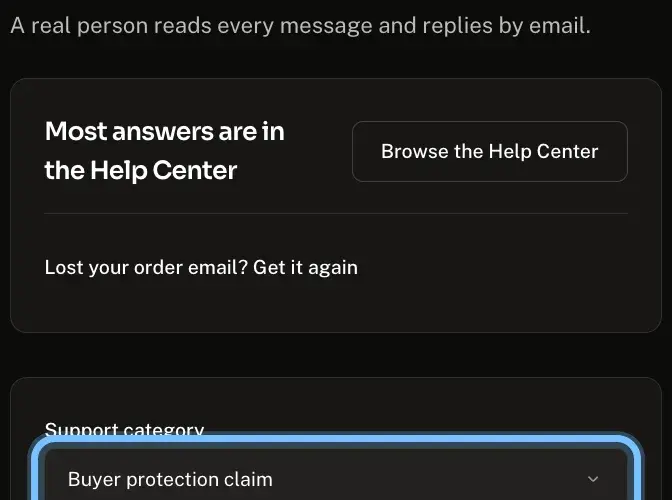
Open Contact us. The Support category is already set to Buyer protection claim.
- 4
Enter your email address under Your email.
- 5
Describe what happened under Description, and copy the message word for word.
- 6
Enter your order number under Order number. It looks like #42101, and it's in your order email and at the top of your order page.
- 7
Under Screenshots, select Add a screenshot and add your screenshot of the error. A claim needs at least one.
- 8
Select Submit ticket. We reply by email, usually within a day.
Troubleshooting
| What you see | What it means | What to do |
|---|---|---|
A box titled "This key won't activate on your account" opens when you buy | The key is for a region your account isn't in | Select Cancel. Buy it only for someone with an account in that region |
The key is for the region its listing stated, but not for your account | The key works as sold, but not on your account | Contact us with your order number. We review it, though we can't promise a refund |
The platform says the key is for another region than your order and the product page stated | The key doesn't match its listing, which is covered | Don't retry. Contact us with your order number |
You changed your mind about a key that works | Buyer protection covers keys that don't work, not a change of mind | |
More than 24 hours have passed since delivery | You're outside the buyer protection window | Contact us with your order number anyway, and tell us what happened |
Frequently asked questions
Related articles
Still stuck?
Contact us with your order number and the exact message you see, word for word, including any error code. We reply by email, usually within a day. If the key can't be used, buyer protection covers you for 24 hours after delivery.