Is my payment information safe on Andalu?
Yes. You enter your card details on a payment page run by Stripe, so they never pass through Andalu, and we never see or store your card number. Andalu's checkout asks only for your email, name, phone number and country. We use them for your order, for support, and to keep fraud off the site.
Stripe is certified every year to PCI Level 1, the strictest security level for handling card payments. Its payment page also asks for your billing address. Andalu doesn't save your card for next time.
Before you pay for a game key or an eSIM, you confirm your mobile number with a code we text to it. Once you've confirmed it, that device stays confirmed for 7 days.
- 1
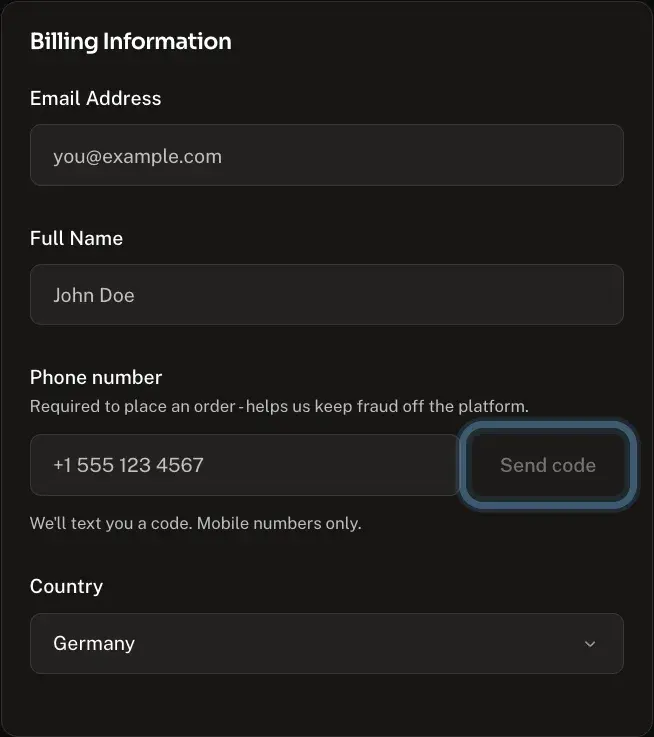
Under Billing details, enter your Email address and Full name. On a device you've bought from before, they're already filled in.
- 2
Enter your mobile number, then select Send code. If this device remembers your number, select Continue beside it instead.
Use a mobile number. Internet and virtual numbers can't be used.
Confirmed your phone on this device in the last 7 days? You won't be asked again.
- 3
Enter the code from the text message. It's checked as soon as you've typed all six digits.
- 4
Check your Country.
- 5
Under Payment method, check the method chosen for you, or select Change to pick another.
- 6
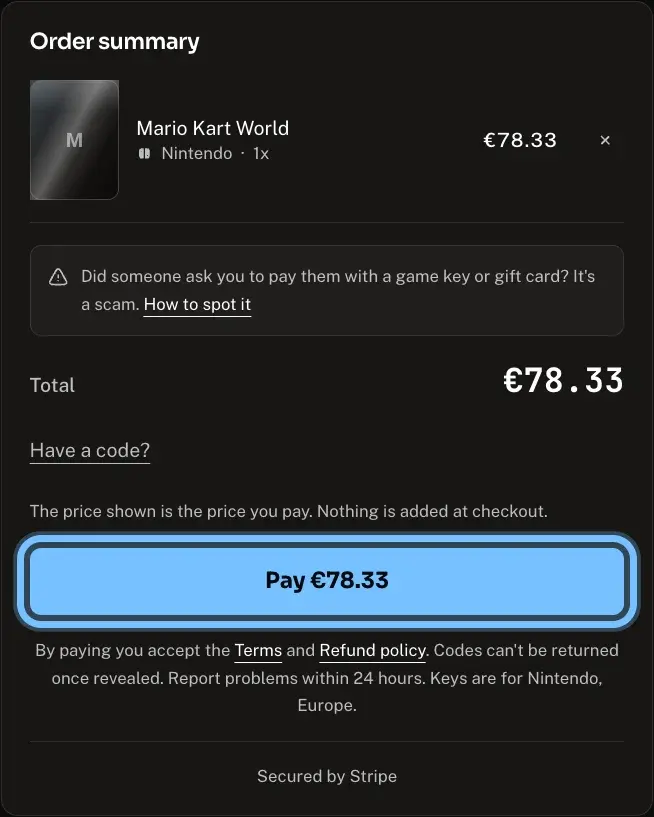
Select Pay. Stripe's secure payment page opens, and its address starts with checkout.stripe.com.
Pressing Pay accepts the Terms and Refund policy, linked under the button.
- 7
Enter your card details on Stripe's page, or pay with Apple Pay or Google Pay.
Your bank may ask you to confirm the payment, for example in its app.
- 8
When the payment goes through, you land on Andalu's order confirmation page.
Buying an eSIM from its page? Buy, the bag button beside a plan, opens a short form where you confirm your mobile number the same way, then takes you to Stripe's payment page.
Troubleshooting
| What you see | What it means | What to do |
|---|---|---|
A page asks for your card, but its address doesn't start with checkout.stripe.com | It isn't our payment page | Don't enter your card. Close the page and start again from Andalu's checkout |
An email or message "from Andalu" asks for your card number, a bank code or a game account password | Andalu never needs these, so we never ask for them | Don't reply and don't open its links. Tell us through Contact us |
Someone asks you to pay them in game keys or gift cards, or to read them a code | Nobody real takes payment in codes, so it's a scam | Don't buy or share any code. See Someone asked me to pay with a game key or gift card. Is it a scam? |
"Use a mobile number. Internet and virtual numbers can't be used to buy on Andalu." | The number is an internet or virtual number, not a mobile one | Enter your mobile number instead, then select Send code |
"Enter your mobile number without the country code" | The number includes the country code, or it's incomplete | Check the country beside the box, enter the number without the country code, then select Send code again |
"That code didn't match. Check it and try again." | The code was mistyped, or it's from an older text | Enter the code from the latest text message, then select Verify |
"Request a new code first." | No code was sent to this number yet | Select Change number, then Send code |
No text message arrives | The number is wrong, or the message is delayed | Wait a minute. Still nothing? Select Change number, check the number and select Send code again |
"Phone verification could not load. Check your connection and try again." | The check couldn't start in your browser | Check your connection, reload the page and try again |
"We can't take this order as it stands. Add another item, or try without a code. Nothing was charged." | A code can push a small order below what we can take | Remove the code, or add another item to your basket, then check out |
A charge with ANDALU.COM in its description that you don't recognize | It may be an order you forgot, or someone else using your card | Contact us with the date and amount. If you think someone used your card, call your bank too |
Frequently asked questions
Related articles
Still stuck?
Contact us with the exact message you see, word for word. If it's about an order, include your order number. We reply by email, usually within a day.