Is it safe to buy from Andalu?
Yes. Andalu sells every product on the site itself, and each listing states its platform and region before you pay. The price you see is the price you pay. Your card details go to Stripe, not to us. If a key doesn't work, buyer protection gets you a replacement or a refund.
Checkout guards against fraud too. Every buyer confirms their mobile number with a text code before paying, your bank may ask you to confirm the payment, and some orders are checked before we deliver them.
The one thing only you can check is that a key matches your account. The steps below take a minute, and you only set your region once.
- 1
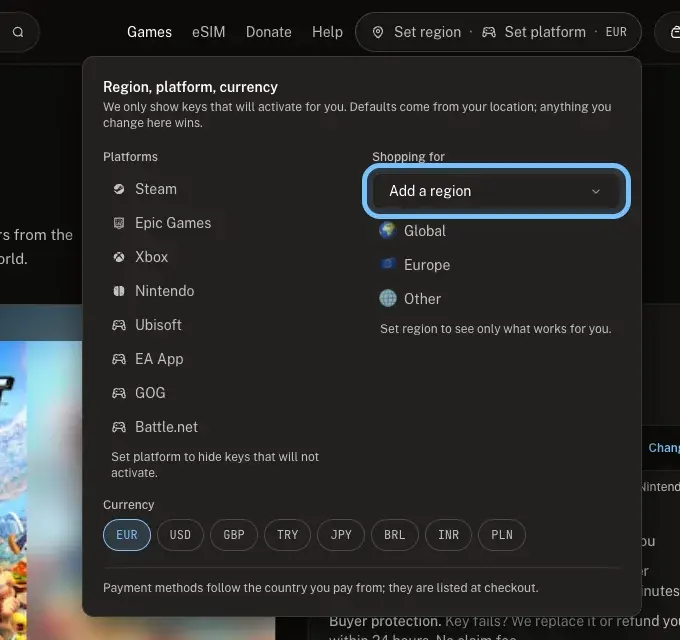
At the top of any page, select Set region.
- 2
Under Shopping for, choose your country in Add a region.
Buying for a console or a launcher? Select it under Platforms too, so the check covers the platform as well.
- 3
Open the game's page.
- 4
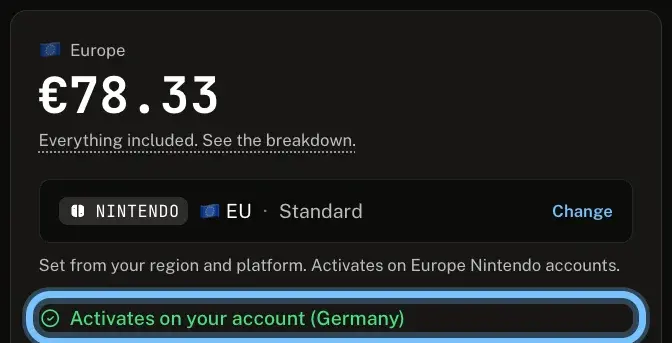
Under the price and version, find Activates on your account.
It says Won't activate on your account instead? That key is for another region or platform. Select Change to pick another version, or don't buy it.
Buying an eSIM? It's chosen by where you're going, not by an account. Check your phone instead: see Is my phone compatible with an eSIM?
Troubleshooting
| What you see | What it means | What to do |
|---|---|---|
"Set your region to check this key works for you" | You haven't set a region yet | Select Set region at the top of the page and choose your country |
"Won't activate on your account: this key is Europe only" (or another region) | The key is for a region your account isn't in | Select Change and pick the version for your region |
"Steam keys only, and your account is set to Xbox" (or other platforms) | The key is for a different platform than yours | Select Change and pick the version for your platform |
"Region not confirmed, check before buying" | The listing doesn't say which region the key is for | Ask us before you buy |
A box titled "This key won't activate on your account" opens when you buy | You're buying a key for a region your account isn't in | Select Cancel, unless the key is for someone with an account in that region |
Frequently asked questions
Related articles
Still stuck?
Not sure a key will work for you? Contact us before you buy. Already bought one that doesn't work? Contact us with your order number and the exact message you see, word for word, including any error code. We reply by email, usually within a day. If the key can't be used, buyer protection covers you for 24 hours after delivery.