What happens if my payment succeeds but I don't get a confirmation?
Don't pay again. Your key arrives by email, and your order confirmation page shows where your order is. If you closed the page, reopen it from your browser history, or search your inbox for your order number. The heading and tracker at the top say what's happening, and this article says what each one means.
Before you start
Check your bank or banking app. If no money has left your account, the payment didn't go through: see Why did my payment fail or get declined?
Use the same browser and device you paid on. That's where the page is in your history.
- 1
Don't pay again, even if you're unsure. A second payment makes a second order.
- 2
Search your inbox for the email for your order, including spam and promotions. Its subject names what you bought and includes your order number, like "Elden Ring, Steam: your key is ready (#42101)". Found it? Select Get your order in it, or copy the key it shows under Your key.
- 3
No email yet? Go back to the tab you paid in. If you closed it, open your browser's history and search for Order confirmation | Andalu, then open the most recent one.
- 4
Read the heading and the tracker at the top of the page, and find them in the table below.
- 5
When the tracker says Sent: check your inbox, select the button named for your email service, such as Open Gmail. It opens your inbox already searched for your order.
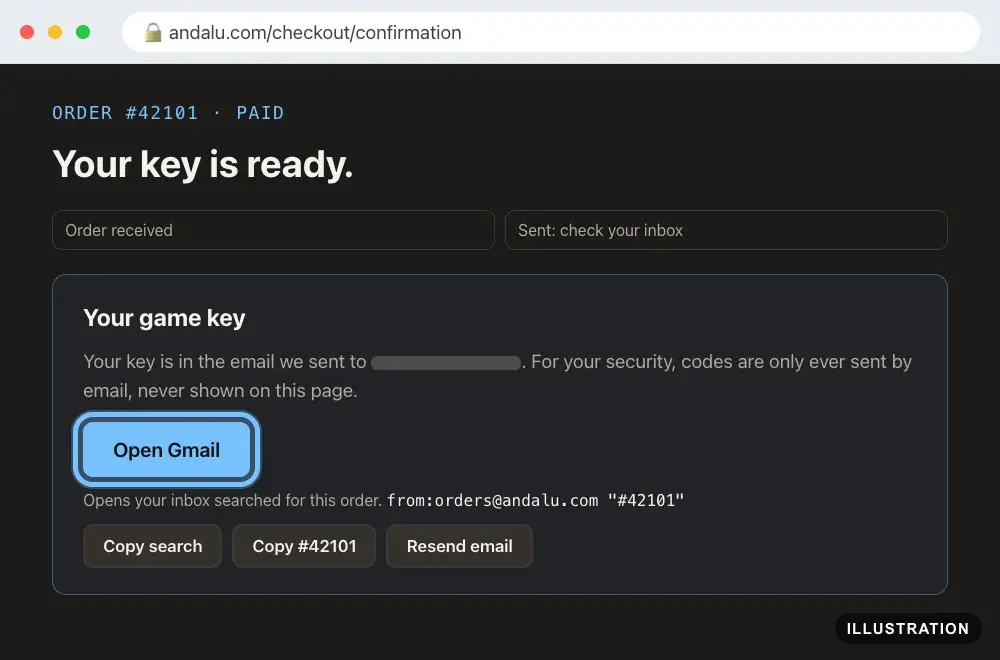
Illustration of your Andalu order page - 6
Still no email? On the contact page, select Lost your order email? Get it again. Enter your order number and the email you paid with, then select Email me my order.
- 7
Keep the email. It's your copy of the key.
Confirm it works
The top of the page says Paid beside your order number.
You have the email for your order, with your key in it or behind its Get your order button. For an eSIM, your QR code is there too.
Troubleshooting
| What you see | What it means | What to do |
|---|---|---|
Your key is ready. or Your keys are on their way. | Your order is paid, and your key is sent, or on its way, by email | Open the email for your order. The page's open button, such as Open Gmail, finds it for you |
No email with your key | It may be in spam or promotions, or the email address had a typo | Check spam and promotions. Still nothing? Use Lost your order email? Get it again on the contact page, or contact us with your order number |
Your order is taking a little longer than usual. | Your order is safe and on its way | Don't pay again. It arrives by email within a few hours. Nothing by the next day? Contact us with your order number |
One item in your order is taking longer than usual to come through. | One item hasn't come through yet | Nothing to do. We send it, or refund it, within 24 hours. If your card has not been charged yet, it won't be until we send it |
Your key order needs a quick manual review | The same kind of check, for the game part of your order | Wait for the check. If you don't have your key within a day, contact us with your order number |
Your game key is on its way | Your key is on its way to your email | Nothing to do. We email your key when it's ready. If you don't have it within a day, contact us with your order number |
Your payment is confirming. | Some bank methods take longer to clear | Nothing to do. We email your key once the payment clears |
Payment not completed | The payment didn't go through, so nothing was ordered | If you paid moments ago, reload in a few seconds. Otherwise select Back to your cart and try again |
Payment received and could not be matched automatically | Your payment arrived, but the order needs a person to finish it | Contact us with the reference on the page |
No order to show | The link you opened doesn't include your order | Open the page from your browser history instead, or contact us |
You can't find the page in your history | You may have paid in another browser, or cleared your history | Contact us with the email you used at checkout, the date, the amount, and a screenshot of the payment in your bank app |
Your bank shows two payments to Andalu | You may have paid twice | Don't pay again. Contact us with both amounts and dates |
Frequently asked questions
Related articles
Still stuck?
Contact us with your order number and the exact message you see, word for word, including any error code. We reply by email, usually within a day. If your key can't be used, buyer protection covers you for 24 hours after delivery.