Why did my payment fail or get declined?
A payment usually fails for one of three reasons: a checkout check that isn't finished, like the phone code, your bank not approving the payment, or a method that doesn't work for your order. The message you see says which. Nothing is charged when a payment fails, so you can fix it and try again.
Before you start
Keep the message you see. Andalu's messages show beside Pay on the checkout page. Card and bank messages show on the Stripe payment page.
Check your bank or banking app first. If the money has already left your account, don't pay again: see What happens if my payment succeeds but I don't get a confirmation?
Have your mobile phone with you. Every order needs the code texted to it, and your bank may ask you to approve the payment on it too.
- 1
Read the message and find it in the table below. It tells you what to fix.
- 2
Fix that one thing, like the phone code or your card details.
- 3
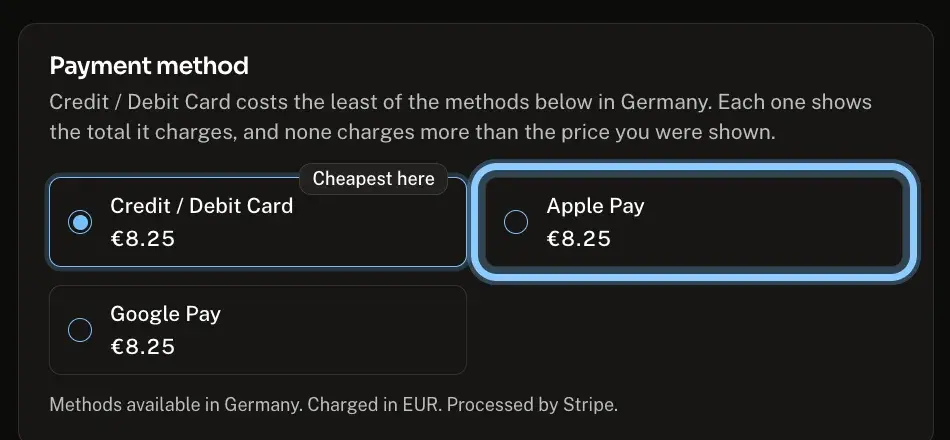
To try another way to pay, go back to checkout and select a different method under Payment method, like Apple Pay.
- 4
Select Pay once. If your bank asks you to approve the payment in its app or by text, approve it straight away.
Confirm it works
Your order confirmation page opens and says Paid beside your order number.
Your bank shows one payment to Andalu, for the total you saw at checkout.
Troubleshooting
| What you see | What it means | What to do |
|---|---|---|
One field needs fixing before you can continue (or a number of fields) | A field is empty or not valid | Look for the red message under each field and fix it |
Verify your phone number to place an order | You haven't confirmed the text code yet | Select Send code, type the code you receive, and select Verify |
Use a mobile number. Internet and virtual numbers can't be used to buy on Andalu. | The number isn't a mobile number | Enter your mobile phone's number and select Send code again |
That code didn't match. Check it and try again. | The code was mistyped | Type the code from the latest text message, then select Verify |
We can't take this order as it stands. Add another item, or try without a code. Nothing was charged. | A code can push a small order below what we can take | Remove the code, or add another item to your cart, then check out |
Checkout is paused for a few minutes. | We've paused checkout briefly to protect buyers. Nothing was charged | Wait a few minutes, then select Pay again |
Too many checkout attempts. Wait a few minutes and try again. | Checkout was tried many times in a short time | Wait a few minutes, then try once more |
We could not verify this checkout. Refresh the page and try again. | A security check on the page didn't finish | Refresh the page, then select Pay again |
We couldn't reach Andalu. Check your connection and try again. | Your connection dropped before checkout could start | Check your connection, then select Pay again |
A message that ends Pick another. | That payment method can't be used for this order, country or currency | Select a different method under Payment method |
We could not confirm this total against the price you were shown. | A price changed while you were checking out. Nothing was charged | Reload the page, check the new total and select Pay again |
The payment page says your card was declined | Your bank refused the payment | Check the card number, expiry date and security code. Still declined? Ask your bank to allow it, or use another card or method |
Your bank asks you to confirm and the payment then fails | The bank approval wasn't finished in time | Select Pay again and approve it in your banking app or with the code it texts you |
The payment page says your card doesn't have enough money | The balance or limit is too low for the total | Use another card or method |
Payment not completed after the payment page | The payment didn't go through, so nothing was ordered | If you paid moments ago, reload in a few seconds. Otherwise select Back to your cart and try again |
Frequently asked questions
Related articles
Still stuck?
Contact us with your order number and the exact message you see, word for word, including any error code. We reply by email, usually within a day.