What payment methods does Andalu accept?
Andalu takes card, Apple Pay and Google Pay in every country, cryptocurrency when you pay in US dollars, and a local bank method in five countries: iDEAL, Bancontact, BLIK, Pix and UPI. None of them adds anything to the price you were shown. Checkout shows the total each method charges, and a cheaper one lowers your total.
Before you start
Checkout offers the methods that work for your Country and the currency you pay in. Check both on the checkout page.
Apple Pay and Google Pay need a card saved in your wallet, on a device and browser that support them.
Local bank methods need the matching bank account or payment app, like your Dutch bank for iDEAL.
- 1
At checkout, look under Payment method. It shows one method chosen for you, with the total it charges. Select Change to see the methods that suit you best, like your local bank method and card, each with its total. The rest are under Other ways to pay; select it to see them all. Every method you can use:
Credit / Debit Card, Apple Pay and Google Pay: every country.
Cryptocurrency: when you pay in US dollars.
iDEAL: the Netherlands, paying in euros.
Bancontact: Belgium, paying in euros.
BLIK: Poland, paying in złoty.
Pix: Brazil, paying in reais.
UPI: India, paying in rupees.
- 2
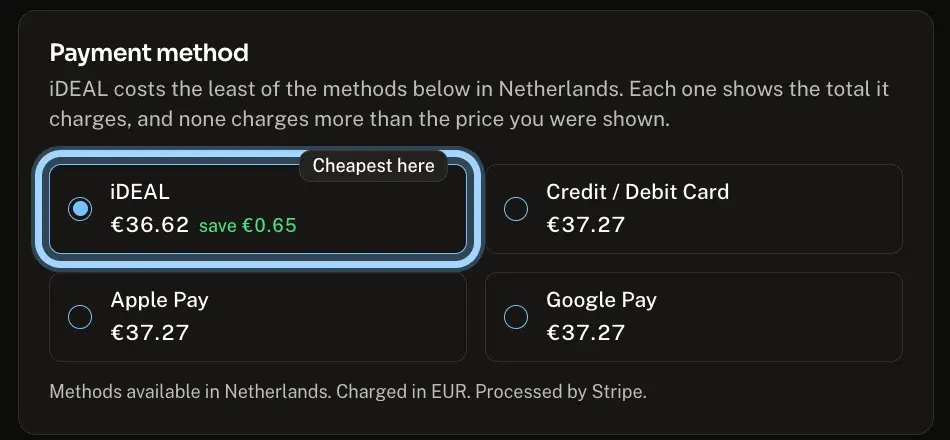
Select a method, like iDEAL in the Netherlands (the picture shows the list after Change and Other ways to pay). The cheapest one here is marked Cheapest here, and a method that costs less shows how much you save.
- 3
Select Pay, then finish on the secure Stripe payment page. Enter your card, use your wallet, or approve the payment in your bank or payment app.
Picked Apple Pay or Google Pay? The payment page offers the wallet when your device and browser support it. If it doesn't appear, you can pay with the card itself on the same page.
Confirm it works
The method you picked is selected under Payment method, and Pay shows its total.
The payment page asks for that method, like your card details or your bank app.
After you pay, your order confirmation page opens.
Troubleshooting
| What you see | What it means | What to do |
|---|---|---|
A method you expected isn't listed | It is under Other ways to pay, or it only works in its own country and currency | Select Other ways to pay, then check Country at checkout and the currency at the top of the page |
iDEAL or another bank method is missing on a small order | On a small order it would cost more to process than your price covers, so it isn't offered | Pay by card, Apple Pay or Google Pay, which cost exactly the price you were shown |
A message that ends is not available in your country paying in your currency, Pick another. | Your country or currency changed after you picked the method | Select another method |
That payment method is not available in EUR right now. Pick another. (or another currency) | The payment network wouldn't take that method in this currency | Select another method and try again |
A message that says a method costs more than the price you were shown covers | That method would cost more than your price allows | Select another method |
Apple Pay or Google Pay doesn't appear on the payment page | Your device or browser doesn't support it, or no card is saved in the wallet | Pay with the card itself on the same page |
Your payment was declined | Your bank or the payment method refused it |
Frequently asked questions
Related articles
Still stuck?
Contact us with your order number and the exact message you see, word for word, including any error code. We reply by email, usually within a day.